Django ORM Lens
English · Русский · Español · 中文
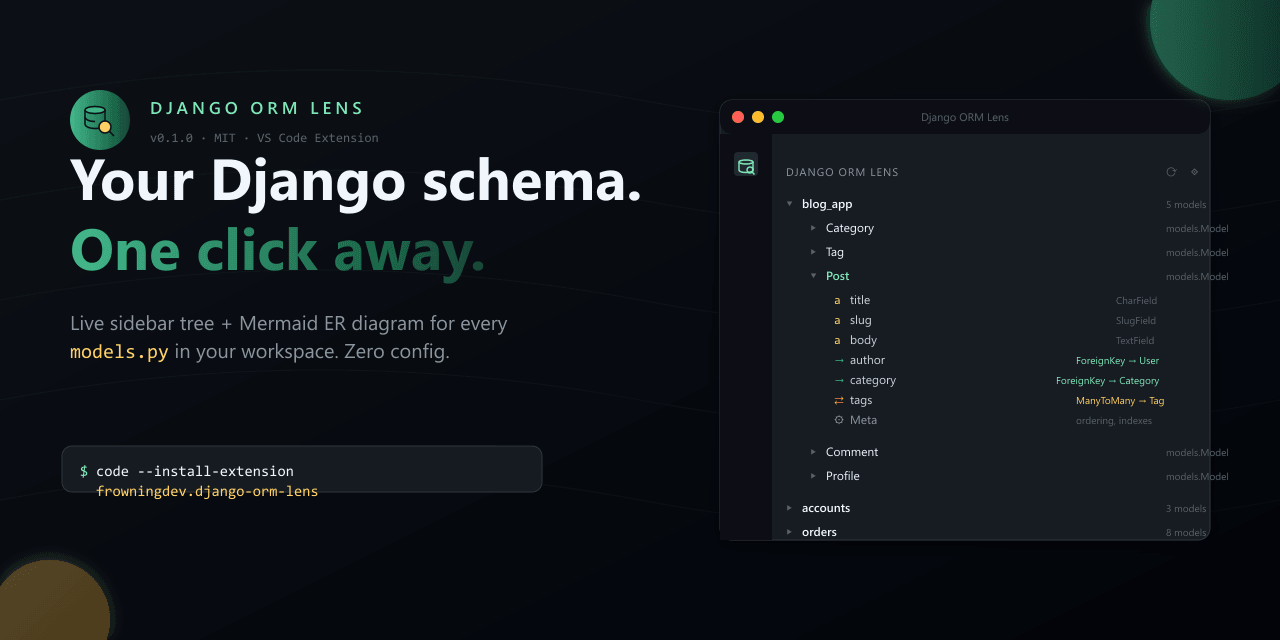
Django ORM Lens
ER diagrams, N+1 detection and migration-risk checks for Django — without booting it.
Your entire model graph — live in your editor sidebar, gating your CI, and answering your AI agent over MCP. All from static parsing: no database, no runserver, no working venv.
Replaces: graph_models + django-schema-graph + hand-drawn ER diagrams + grep archaeology.









Featured in Django News #347 · PyCoder’s Weekly #746
⚡ 10 seconds to first insight
uvx django-orm-lens scan -f table   # every app and model at a glance
uvx django-orm-lens nplusone        # N+1 loops, with the select_related to add
uvx django-orm-lens migration-risk  # migrations that lock tables or fail on existing rows
Cold clone, broken venv, no settings module — you still see every app and model of the project, then the N+1 loops and risky migrations in it, right in your terminal. (uvx is from uv; pipx run works the same way.)
Then pick your surface — three distributions, one parser core:
| You are | Install | You get |
|---|---|---|
| Editor user — VS Code / Cursor / Windsurf / VSCodium | code --install-extension frowningdev.django-orm-lens |
Field autocomplete in .filter(), sidebar tree, live ER diagram, hover cards, 18 lint rules with QuickFixes |
| Terminal / CI user | pip install django-orm-lens |
17 subcommands, SARIF + PR annotations, pre-commit hooks, a GitHub Action |
| AI-agent user — Cursor / Claude Code / Aider / Zed / Continue | pip install "django-orm-lens[mcp]" |
13 read-only MCP tools answering schema questions from ground truth |
MCP setup is one JSON block — see Integrations. Point DJANGO_ORM_LENS_ROOT at your Django project’s absolute path.
🆓 Paid-tier capabilities, free and MIT
Schema review is a paid category nearly everywhere. A bot that reviews every pull request, analysis that follows a queryset past the function it was built in, a check that catches schema drift, index advice grounded in real table statistics — those normally sit behind a per-seat or per-database subscription.
All of it is here, MIT-licensed, with no tier gate, no seat count, no account, and no telemetry:
| Capability usually sold as a paid tier | Here |
|---|---|
| PR review bot for schema changes — posts once, then updates in place | blast-radius + the Action |
| Analysis that follows a queryset across functions | nplusone |
| Schema drift detection | drift |
| Index proposals from observed QuerySet usage | suggest-indexes |
| Migration risk weighed against real table sizes | blast-radius --stats |
| Blast radius of a destructive migration | blast-radius |
| Cross-layer impact of removing a field | impact |
There is no Pro tier, and none is planned. If the tool saves you an afternoon, a star is the entire ask.
📊 Traction














If the tool saves you a
grepnext time you touch a strange Django project — a star helps others find it.
📈 Star growth
⚡ Install
VS Code / Cursor / Windsurf (VS Code Marketplace):
code --install-extension frowningdev.django-orm-lens
VSCodium / code-server / Gitpod / any OSS Code fork (Open VSX):
codium --install-extension frowningdev.django-orm-lens
Or search Django ORM Lens in the Extensions view — same publisher frowningdev on both registries.
Terminal & AI coding agents:
pip install django-orm-lens              # CLI only
pip install "django-orm-lens[mcp]"       # + MCP server for AI agents
Requires Python 3.9+. Zero runtime dependencies for the CLI.
Docker (v0.6+):
docker run --rm -v "$PWD:/workspace" ghcr.io/frowningdev/django-orm-lens scan --path .
Multi-arch (amd64 + arm64). No Python required on the host. Good for CI and one-off audits.
🎯 The problem
Works offline. Works on a broken venv. Works on someone else’s laptop. Works in CI.
You open a Django project. It has 20 apps. You need to answer a simple question:
“Which app owns the
Ordermodel, and how is it connected toUser?”
Today, that means: Ctrl+P, “models”, scroll through 30 hits, open five files, Ctrl+F for class Order, read through 400 lines of ForeignKey('otherapp.Something') strings, try to remember what you learned two files ago.
Half a day gone. Every time. On every project.
✨ With Django ORM Lens
| ### 📚 A tree of everything Every app → every model → every field → every `Meta` option. Grouped by application, sorted alphabetically, expandable. Icons distinguish `CharField` from `ForeignKey` from `ManyToManyField` at a glance. | ### 🕸️ A live ER diagram One command opens a Mermaid entity-relationship diagram of your entire schema. Watch it redraw as you edit. Export to SVG. `ForeignKey`, `OneToOneField`, and `ManyToManyField` become proper cardinality arrows. |
| ### 🔎 Hover for relations Hover over `ForeignKey('app.Model')` in any Python file → a card pops up with the target model's fields, relations, and a "Jump to" link. No `Ctrl+F`, no file dialog. | ### 🧭 Jump-to-definition Click any field in the tree → cursor lands on the exact line. Filter the tree by app or model name. Split `models/` packages are fully supported. |
| ### ⚡ Zero configuration No `DJANGO_SETTINGS_MODULE`. No `runserver`. Parses `models.py` statically. Works with a broken venv, a missing dependency, or on someone else's laptop. | ### 🎨 Native VS Code UI Dark theme. Light theme. Your theme. Follows your icon theme, your font, your key bindings. Nothing garish, nothing branded. |
🚀 Power features
| ### 💥 Blast radius The review-time question a schema change actually raises: **what does this hit?** Every destructive migration operation becomes a target carrying its risks, every place in the codebase that still reads it, and — for whole-model operations — the cascade fallout. `migration-risk`, `impact` and `cascade` each answer a third of that; nobody joins them by hand, so the tool does. `--format markdown` is a postable PR comment; `--stats` turns "probably populated" into `~41 000 000 rows, 12.0 GB` from a read-only query you run yourself, with no database credential anywhere near CI. | ### 🧭 Schema drift `makemigrations --check` without booting Django. Each app's migrations are replayed in order into the field set they imply, then compared against what `models.py` declares. Django's own check needs a working settings module, an importable app registry and every dependency installed — unavailable on a cold clone or a broken venv, which is exactly when the answer is cheapest to act on. Only the dangerous direction fails the build: a field declared but never migrated means the column will not exist, and the first query touching it errors. |
| ### 🎯 Inline diagnostics & QuickFixes (18 rules) Static analysis over `.py` files with Ruff-style codes (`DOL001`..`DOL041`), Clippy-style `Applicability`, and per-rule severity overrides. `.count() > 0` → `.exists()`, `null=True` on `CharField`, missing `on_delete`, `datetime.now()` → `timezone.now()`, planner-GUC overrides in raw SQL (`enable_*`, `plan_cache_mode`, `jit*`; diagnostic-only), and a dozen more. Suppress inline with `# django-orm-lens-disable-next-line DOL007`. | ### 🧪 Factory generator Right-click any model → `factory_boy` `DjangoModelFactory` scaffold with Faker providers keyed by field type. `CharField(max_length)` scales word-count buckets, `DecimalField(N,D)` computes `left_digits=N-D`, `choices=` maps to `Iterator`, M2M gets `@post_generation`. FK chains pull related factories transitively. Also available as CodeLens above each model class. |
| ### 🕰 Time-Travel Schema Diff Pick a `models.py`, pick two commits, get a typed diff as PR-ready markdown. `AddModel` / `DropModel` / `RenameModel` / `ModifyModel` events with confidence-scored rename detection (Levenshtein + field-shape Jaccard). Renames are first-class events, never `Add + Drop`. Blob-SHA LRU cache — commits that don't touch `models.py` share their parsed snapshot. | ### 🔎 Impact analysis "What breaks if I remove this field?" — right-click a field or model → workspace-wide scan grouped by Django layer (models, serializers, forms, admin, views, urls, templates, tests, migrations). Findings carry a **Certain / Likely / Possibly** confidence tag. Handles ORM string refs (`order_by("-author")`), kwarg lookups (`filter(author__id=1)`), `Meta.fields` tuples, and template variables. |
| ### ⚡ Interactive query builder Right-click a field or model → pick a template → snippet inserted at cursor (with tab-stops) or in a fresh untitled buffer. `.filter(field=?)` on an FK auto-appends `.select_related(...)`, `.annotate(post_count=Count('post_set'))` honours `related_name`, `.prefetch_related` for M2M, `.values('field').distinct()`, `.only('field')`. | ### 🎨 Sidebar UX overhaul Stable `TreeItem.id` — refresh no longer collapses the tree. Rich `MarkdownString` tooltips with `command:` deep-links. Activity-bar badge counts DOL### issues. `FileDecorationProvider` badges: red `!` on FK-without-`on_delete`, yellow `~` on `null=True` string fields (bubbles up to the parent Model row, Git-style). |
📸 What it looks like
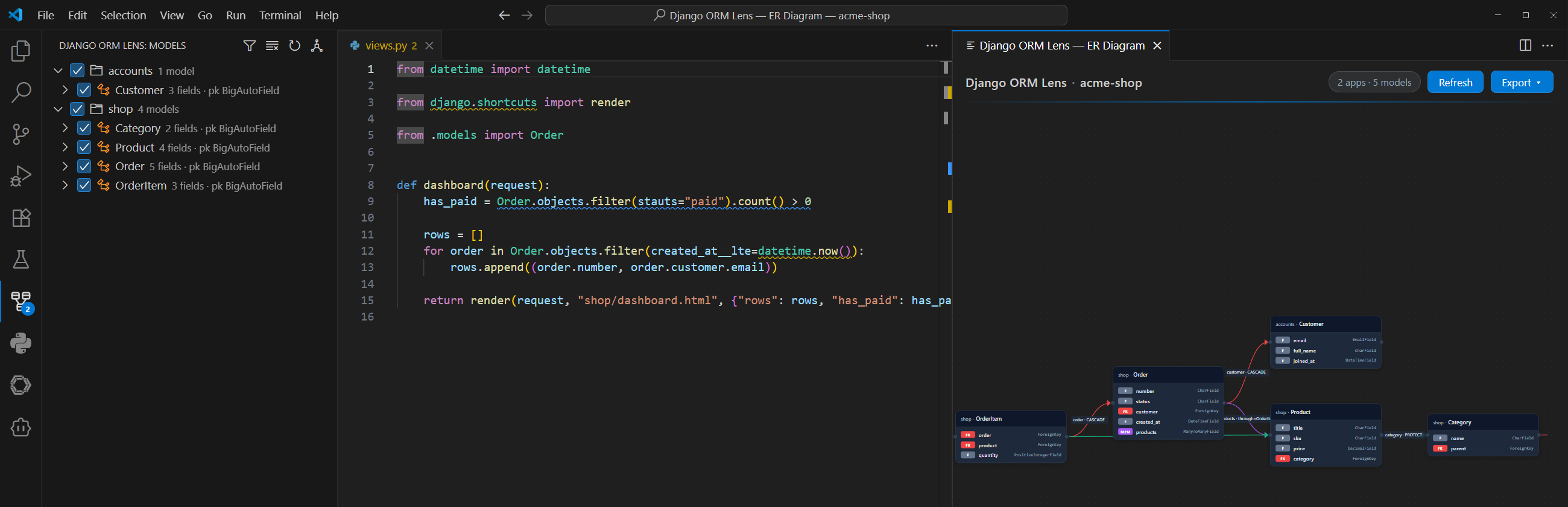
Live sample — real django-orm-lens er output, rendered by GitHub right here:
erDiagram
  User {
    CharField display_name
  }
  Tag {
    CharField name
  }
  Post {
    CharField title
    DateTimeField created_at
  }
  Comment {
    TextField body
  }
  Post }o--|| User : "author [CASCADE, as posts]"
  Post }o--o{ Tag : "tags [as posts]"
  Comment }o--|| Post : "post [CASCADE, as comments]"
  Comment }o--|| User : "author [SET_NULL]"
Also included in the extension:
- 🕸️ Live ER diagram — Mermaid cardinality arrows, edge labels (
CASCADE,through Model,as related_name), theme-aware, one-click SVG export - 🔎 Hover cards — over any
ForeignKey('app.Model')orManyToManyField(...), with a one-click jump link - 🧭 CodeLens — above every
class Modelline: field count, relation count, and an Open ER diagram action - 🎨 Named themes —
auto/default/dark/forest/neutralfor the diagram webview
🤖 For terminals and AI coding agents
The same parser that powers the VS Code extension ships as a standalone Python package — with an optional MCP (Model Context Protocol) server so any MCP-compatible AI agent can navigate your Django schema without importing Django or booting your app.
CLI
django-orm-lens scan -f json                 # every app, every model, every field
django-orm-lens describe blog.Post           # one model in Markdown
django-orm-lens list | fzf                   # flat app.Model — pipes anywhere
django-orm-lens er > schema.mmd              # ER diagram — Mermaid (default)
django-orm-lens er -f dbml > schema.dbml     # …or DBML: paste into dbdiagram.io
django-orm-lens er -f d2 > schema.d2         # …or D2 / plantuml / dot
django-orm-lens diff before.json after.json  # what a PR changes structurally
django-orm-lens nplusone --format github     # N+1 findings as PR annotations
django-orm-lens migration-risk -f sarif      # SARIF for GitHub Code Scanning
django-orm-lens suggest-indexes blog.Post    # Meta.indexes proposals from usage
django-orm-lens signals                      # sender→signal→handler graph
django-orm-lens migration-deps blog -f mermaid   # per-app migration DAG
django-orm-lens cascade blog.Author          # what one delete() takes down
django-orm-lens impact author                # what still references a field
django-orm-lens blast-radius -f markdown     # risks + who still reads them
django-orm-lens drift                        # migrations vs models, no boot
django-orm-lens stats-sql                    # read-only SQL for --stats
impact,blast-radius,driftandstats-sqlship in py-1.7.0 and later.
Every command accepts --path <dir> and --exclude <glob>. nplusone / migration-risk / diff exit code 1 on findings — drop them into CI to block PRs on regressions.
MCP server
Register it once with your agent and it exposes thirteen read-only tools:
| Tool | Purpose |
|---|---|
list_apps |
Every Django app in the workspace with model counts |
list_models |
Flat app.Model list, optional app filter |
describe_model |
Full field / relation / Meta detail for one model |
find_relations |
Inbound + outbound relations for one model |
cascade_preview |
Blast radius of one delete(), grouped by on_delete |
er_diagram |
ER diagram — mermaid / dbml / d2 / plantuml / dot |
describe_migration_dependency |
Per-app migration DAG: roots, leaves, cross-app deps |
suggest_indexes |
Meta.indexes proposals from observed QuerySet usage |
signal_graph |
Sender→signal→handler graph from @receiver decorators |
blast_radius |
What a destructive migration hits: its risks, the code still reading it, the cascade fallout |
drift |
makemigrations --check without booting Django — migrations diffed against models.py |
impact |
Every reference to a field or model name, grouped by Django layer |
nplusone_scan |
Static N+1 findings for the whole workspace |
# Start it directly
django-orm-lens-mcp

# Or via the CLI subcommand
django-orm-lens mcp
Workspace resolution (py-1.3.0+). Every tool accepts an optional
workspace_root argument on the call. Resolution priority: explicit arg →
$DJANGO_ORM_LENS_ROOT → current working directory. Invalid or non-Django
paths return a structured envelope
({"error": "WORKSPACE_NOT_DJANGO", "hint": "…"}) instead of empty results,
so the agent can self-correct. Optional sandbox via
DJANGO_ORM_LENS_ALLOWED_ROOTS (;-separated on Windows, : elsewhere).
Agent skill
The tools tell an agent what is true; the skill tells it what to do with
that. skills/django-orm-lens is a SKILL.md
package with playbooks for migration review, safe renames and removals,
N+1 fixes and cascade checks, a safe rewrite for each of the 16 migration
rules, and audit.py for a one-command verdict (BLOCK / FIX BEFORE DEPLOY /
SHIP). It uses the MCP server when connected and falls back to the CLI via
uvx.
- Install from Agensi (free), or
- copy the folder into your agent’s skills directory, e.g. for Claude Code:
git clone --depth 1 https://github.com/FROWNINGdev/django-orm-lens
cp -r django-orm-lens/skills/django-orm-lens ~/.claude/skills/
🛡️ Gate your CI
Schema regressions are cheapest to catch the moment they enter a PR. Four zero-config ways to block them:
Blast-radius PR bot — the whole schema review as one comment, updated in place on every push instead of a new comment each time:
name: Schema review
on: pull_request

permissions:
  contents: read
  pull-requests: write        # only for `comment: true`

jobs:
  blast-radius:
    runs-on: ubuntu-latest
    steps:
      - uses: actions/checkout@v4
      - uses: FROWNINGdev/django-orm-lens@action-v1
        with:
          command: blast-radius
          only-changed: true          # scope to migrations this PR touches
          comment: true               # post once, then update in place
          github-token: $
The comment goes up before the job fails, so a blocked PR still explains why. only-changed reads the PR’s file list from the API rather than git diff, because actions/checkout defaults to fetch-depth: 1 and the base commit is not in the local history. On push events both flags skip with a notice instead of failing, so one workflow covers both triggers.
The Action installs from PyPI, so
blast-radiusanddriftneed py-1.7.0 or later — pin it withversion: 1.7.0if your workflow must not drift. To run an unreleased build instead, addinstall: falseand install the source yourself; this repo’s own workflow does exactly that, and is what verifies the Action on every PR.
pre-commit — two hooks, nothing to install locally:
# .pre-commit-config.yaml
repos:
  - repo: https://github.com/FROWNINGdev/django-orm-lens
    rev: py-v1.13.3
    hooks:
      - id: django-orm-lens-nplusone
      - id: django-orm-lens-migration-risk
GitHub Action — findings appear as PR annotations with zero extra permissions:
- uses: FROWNINGdev/django-orm-lens@action-v1
  with:
    command: migration-risk      # or: nplusone
    format: github               # ::error / ::warning annotations on the diff
SARIF → Code Scanning — findings land in the repo Security tab:
- run: |
    pip install django-orm-lens
    django-orm-lens migration-risk --format sarif --exit-zero > lens.sarif
- uses: github/codeql-action/upload-sarif@v3
  with:
    sarif_file: lens.sarif
Exit codes are CI-native: diff and nplusone exit 1 on findings, migration-risk and blast-radius exit 1 on critical findings, drift exits 1 when a field is declared but never migrated. Add --exit-zero for report-only mode.
🔌 Integrations
| Client | How to enable | Status |
|---|---|---|
| VS Code | code --install-extension frowningdev.django-orm-lens |
✅ |
| Cursor | same VSIX + optional MCP entry in ~/.cursor/mcp.json |
✅ |
| Windsurf / VSCodium / any Code fork | install the VSIX from the Marketplace or GitHub Releases | ✅ |
| Aider | add django-orm-lens-mcp to your mcp.json |
✅ (via MCP) |
| Continue.dev | register the MCP server in ~/.continue/config.json |
✅ (via MCP) |
| Zed | register the MCP server in Zed settings | ✅ (via MCP) |
| Any MCP-compatible client | point command at django-orm-lens-mcp, set DJANGO_ORM_LENS_ROOT |
✅ |
| pre-commit | repo: https://github.com/FROWNINGdev/django-orm-lens + two hook ids |
✅ |
| GitHub Actions | uses: FROWNINGdev/django-orm-lens@action-v1 — annotations or SARIF |
✅ |
| Discoverable via MCP Registry | official Model Context Protocol server directory | ✅ |
| Plain terminal / CI | pip install django-orm-lens && django-orm-lens scan |
✅ |
Example: Cursor / any MCP client
{
  "mcpServers": {
    "django-orm-lens": {
      "command": "django-orm-lens-mcp",
      "env": { "DJANGO_ORM_LENS_ROOT": "/abs/path/to/your/project" }
    }
  }
}
⚡ Performance
The regression suite parses the vendored model graphs of Zulip, Saleor, Wagtail, django CMS, and Mezzanine — 59 models across 13,478 lines of real-world models.py — in about 20 ms end-to-end on a laptop (21 ms best-of-3 on the repo’s golden-fixture corpus; a <2 s guard runs in CI on every matrix cell).
Reproduce it yourself:
git clone https://github.com/FROWNINGdev/django-orm-lens && cd django-orm-lens/cli
pip install -e . && python -m pytest tests/test_golden_fixtures.py tests/test_golden_snapshots.py -q
🎯 Who this is for
- Django developers joining a codebase with 10+ apps and getting lost in
models.pysprawl. - Contract / freelance engineers who need to grasp an unfamiliar Django project in the first hour, not the first week.
- Teams onboarding new hires who want a one-glance schema view without spinning up documentation infrastructure.
- AI-agent power users (Cursor / Aider / Zed / Continue / any MCP-compatible client) who need the agent to answer schema questions accurately — without giving it database credentials or booting Django.
- CI pipelines that verify schema shape (e.g. “did we accidentally break a
related_name?”) without importing the project. - Solo indie devs on a broken venv or someone else’s laptop — no
runserver, nomanage.py migrate, still works.
🗺️ Market position
Django ORM Lens sits at the intersection of editor tooling and AI-agent tooling — a slot no existing package covers:
| Segment | Existing option | What it costs you |
|---|---|---|
| Boot-and-graph | django-extensions graph_models |
Requires Graphviz + Django settings + a working DB URL |
| Web-based viewer | django-schema-graph |
Requires a running Django server; hosts one more thing to break |
| Admin panel | Django Admin | Requires runserver + auth + database — great for data, not for architecture |
| Editor plugin | PyCharm’s Django Structure | Locked to PyCharm; no CLI, no AI-agent story |
| MCP server | (none until now) | AI agents guess your schema from source, imperfectly |
Django ORM Lens is the only tool that ships three surfaces from one parser: a VS Code extension (any Code fork), a zero-dep CLI (terminals + CI), and an MCP server (AI agents). All static. All free. All MIT.
🤔 How is this different?
| Django ORM Lens | django-extensions graph_models |
django-schema-graph |
Django Admin | PyCharm Django Structure | |
|---|---|---|---|---|---|
| Works without a bootable Django project | ✅ | ❌ | ❌ | ❌ | ⚠️ |
| Zero-install (no graphviz, no server) | ✅ | ❌ | ❌ | ❌ | ❌ (needs PyCharm) |
| Works in VS Code / Cursor / any Code fork | ✅ | ❌ | ❌ | ❌ | ❌ |
| Sidebar tree inside the editor | ✅ | ❌ | ❌ | ❌ | ✅ |
| Live ER diagram | ✅ | ✅ | ✅ | ❌ | ❌ |
Hover cards on ForeignKey |
✅ | ❌ | ❌ | ❌ | ⚠️ |
| CodeLens on model classes | ✅ | ❌ | ❌ | ❌ | ❌ |
Split models/ package support |
✅ | ⚠️ | ⚠️ | ✅ | ✅ |
| CLI for terminal / CI | ✅ | ⚠️ | ❌ | ❌ | ❌ |
| MCP server for AI agents | ✅ | ❌ | ❌ | ❌ | ❌ |
| Discoverable in the MCP Registry | ✅ | ❌ | ❌ | ❌ | ❌ |
| Free & open-source (MIT) | ✅ | ✅ | ✅ | ✅ | ❌ (paid IDE) |
| Django version support | 4.0 – 5.2 | latest | 3.2 – 4.1 (stale since 2023) | latest | latest |
django-schema-graphhas not been updated since 2023-05 and does not test Django 5.x.
When you want something else
Honest boundaries: profiling a live request → django-debug-toolbar. Historical request profiling → django-silk. Query-count assertions inside a test suite → django-perf-rec. Production APM on real traffic → Scout / Sentry. Django ORM Lens deliberately stays static — it’s the layer that works before the app can even boot, and the only one your CI and your AI agent can use on any checkout.
⚙️ Configuration
The defaults are opinionated and sensible. If you need to tweak:
// .vscode/settings.json
{
  "djangoOrmLens.excludeGlobs": [
    "**/migrations/**",
    "**/node_modules/**",
    "**/venv/**",
    "**/.venv/**",
    "**/env/**"
  ],
  "djangoOrmLens.autoRefresh": true
}
| Setting | Type | Default | What it does |
|---|---|---|---|
djangoOrmLens.excludeGlobs |
string[] |
See above | Glob patterns to skip when scanning |
djangoOrmLens.autoRefresh |
boolean |
true |
Rescan on models.py changes |
djangoOrmLens.codeFixes.enabled |
boolean |
true |
Master switch for the DOL### diagnostics + QuickFixes |
djangoOrmLens.rules |
object |
{} |
Per-rule severity: { "DOL007": "off", "DOL013": "error" } |
djangoOrmLens.rulesSelect |
string[] |
[] |
Ruff-style select. ["DOL0"] runs only queryset+model rules |
djangoOrmLens.rulesIgnore |
string[] |
[] |
Ruff-style ignore. ["DOL03"] silences form/view rules |
🔬 Rule catalogue
Eighteen editor-side checks (DOL001–DOL041) with Ruff-style codes, per-rule severity, and Clippy-style applicability — plus sixteen CLI-side migration-risk rules and the static N+1 analyzer. Every rule now has its own documentation page.
| Category | Rules | Examples |
|---|---|---|
| Queryset | DOL001–DOL007 |
.count() > 0 → .exists(), FK access in loops (N+1) |
| Model definition | DOL011–DOL015 |
ForeignKey without on_delete, null=True on string fields |
| Datetime | DOL021–DOL022 |
datetime.now() → timezone.now() |
| Forms / views | DOL031–DOL032 |
locals() in render(), Meta.fields = '__all__' |
| Raw SQL | DOL041 |
SET enable_hashjoin = off, plan_cache_mode, jit overrides in app code |
| Migration risks | 16 rules | NOT NULL add without default, table-locking index builds, irreversible data migrations |
| Static N+1 | 1 analyzer | FK/M2M access in loops without select_related / prefetch_related |
→ Full rule reference — every code with bad/good examples, QuickFix behaviour, and suppression syntax.
Suppress inline
# django-orm-lens-disable-next-line DOL007
for user in User.objects.all():
    print(user.profile)  # not flagged

qs.count() > 0  # django-orm-lens-disable-line DOL001

# django-orm-lens-disable DOL011  ← on its own line, kills DOL011 for the rest of the file
Applicability follows Rust’s Clippy: safe fixes can be applied automatically (“Fix All”), suggestion fixes are offered as a QuickFix but reviewed, unsafe findings never auto-apply. Fixes are separated from analyzers (Roslyn-style), so one rule can grow multiple fixers over time without touching detection logic.
🧭 Commands
Open the command palette (Ctrl+Shift+P / Cmd+Shift+P) and type “Django ORM Lens”:
| Command | What it does |
|---|---|
Django ORM Lens: Refresh |
Force-rescan the workspace |
Django ORM Lens: Show ER Diagram |
Open the Mermaid ER diagram side-by-side |
Django ORM Lens: Filter Models |
Filter the tree by app / model / field name |
Django ORM Lens: Clear Filter |
Restore the full tree |
Django ORM Lens: Jump to Model |
Programmatic — triggered by tree clicks and hover cards |
Django ORM Lens: Find Reverse References |
Right-click a model — QuickPick of every FK pointing at it |
Django ORM Lens: Generate factory_boy Factory |
Right-click a model or use CodeLens — scaffold a DjangoModelFactory |
Django ORM Lens: Schema Diff (Time-Travel) |
Pick two commits — get a typed diff as a markdown buffer |
Django ORM Lens: Find Impact (What Uses This?) |
Right-click a field or model — workspace-wide reference scan |
Django ORM Lens: Build Query (Insert Snippet) |
Right-click a field or model — pick an ORM template |
🗺️ Roadmap
Shipped
- Sidebar tree grouped by app
- Live Mermaid ER diagram
- Hover cards over
ForeignKey('app.Model') - Filter tree by name
- Split
models/package support - Export ER diagram as SVG
- Python CLI + MCP server for terminals and AI agents
- Welcome view for empty workspaces
- Path-safe jump-to-definition and sanitized hover markdown
- v0.3.0 — CodeLens above each model class (
N fields · N relations · Open ER diagram) - v0.3.0 — Edge labels on the diagram (
CASCADE,SET_NULL,PROTECT,related_name) - v0.3.0 — Named color themes (
auto/default/dark/forest/neutral) - v0.3.1 —
through_modelon M2M edges (contributed by @kingrubic) - v0.3.1 — Listed in the official MCP Registry + Glama.ai
- v0.6.0 — CLI
nplusone— static N+1 detector (FK/M2M access inside loops withoutselect_related/prefetch_related) - v0.6.0 — CLI
migration-risk— flags risky operations inmigrations/*.py(15 rules today) - v0.6.0 — CLI
diff— compare two schema JSON dumps for PR review - v0.6.0 — ER-diagram minimap color-codes nodes by Django app
- v0.6.0 — README translations: 🇷🇺 Russian, 🇪🇸 Spanish, 🇨🇳 Chinese
- v0.6.0 — Docker image on GHCR:
docker run ghcr.io/frowningdev/django-orm-lens - v0.7.0 —
settings.AUTH_USER_MODELresolves everywhere: n+1 reverse-relations, signal senders, Mermaid ER, VS Code webview, inbound-relation panel, React ER - v0.7.0 — AST-based field parser:
ForeignKey(on_delete=CASCADE, to='User')resolves regardless of kwarg order (Python + TS parity) - v0.7.0 — Public shared helpers:
find_user_model,resolve_related_tail,find_model,iter_workspace_py_files(Python) +findUserModel,resolveRelatedTail(TS) - v0.7.0 —
--verboseno longer walks the tree twice;WorkspaceIndex.scanned_filescarries the count - v0.7.3 — PEP-526 type annotations on fields (
jti: CharField[str] = models.CharField(...)) now parse — reported by @jsabater (#25) with a clean Django Ninja 1.6 repro - v0.7.4 — PEP-695 generic class headers (Python 3.12+):
class Container[T](models.Model):now parses - v0.7.5 — Aliased models module (
from django.db import models as m) and third-party field packages (jsonfield.JSONField) now detected - v0.7.6 — Tab-indented model bodies now parse (editors defaulting to tabs no longer show empty models)
- v0.8.0 — Inline QuickFixes: 16 rules (
DOL001..DOL032) with per-rule severity + Ruff-style select/ignore + inline# django-orm-lens-disable-next-line - v0.8.0 — Factory generator:
factory_boyscaffold from any model with Faker providers keyed by field type - v0.8.0 — Time-Travel Schema Diff: pick two commits → typed markdown diff with first-class rename detection
- v0.8.0 — Impact analysis: workspace-wide field-reference scan across every Django layer with Certain/Likely/Possibly confidence tags
- v0.8.0 — Interactive Query Builder: right-click → template → snippet inserted at cursor, grammar-aware (FK gets
.select_related,related_namehonoured) - v0.8.0 — Sidebar UX overhaul: stable
TreeItem.id,MarkdownStringtooltips withcommand:deep-links,FileDecorationProviderbadges,TreeView.badgeon the activity bar, three when-gatedviewsWelcomestates
v1.5.0 — the “one core, three surfaces” wave
- CI formats: SARIF 2.1.0 +
--format githubPR annotations fornplusoneandmigration-risk - Four analyzers promoted from MCP-only to the CLI:
suggest-indexes,signals,migration-deps,cascade er --format dbml | d2 | plantuml | dot— community-standard diagram exports (dbdiagram.io, D2, PlantUML, Graphviz —dotcontributed by @JJordan0C)- Three new migration-risk rules:
runpython_no_reverse,alter_unique_together_lock,alter_index_together_deprecated— 15 total - pre-commit hooks (
django-orm-lens-nplusone,django-orm-lens-migration-risk) + composite GitHub Action docs/rules/— a documentation page for every rule (19 pages)- Golden-snapshot regression suite over 59 real-world models (Zulip / Saleor / Wagtail / django CMS / Mezzanine); ruff + mypy now gate CI
- Migration dependency graph —
migration-deps(text / json / mermaid)
py-1.7 → 1.8 — the schema-intelligence wave
blast-radius— migration risks joined with what still reads the schema they touch, as a PR bot (comment: true, sticky,only-changed)drift—makemigrations --checkwithout booting Djangoimpact <name>— what still references a model or field, grouped by Django layerblast-radius --stats+stats-sql— optional production row counts from read-only SQL you run yourself (the tool never holds a DB credential)nplusoneresolves across functions — a queryset returned by a helper is followed into the loop that consumes itblast_radius,driftandimpactexposed as MCP tools — thirteen tools for AI agentsdriftdocuments its!!/~marks in the report and in--help— reported by @sevdog (#57)driftfollows inheritance from abstract bases — an abstract base’s fields count as the concrete child’s own, as Django treats them — reported by @sevdog (#58)suggest-indexrecognises the indexes Django already made — primary key (pkandidare one lookup),db_index,unique, foreign keys,unique_together,UniqueConstraint— reported by @sevdog (#60), same cause independently found by @RinZ27 (#61)- A sixth golden fixture — Read the Docs joins Zulip, Saleor, Wagtail, django-CMS and Mezzanine, putting the parser under 75 models and 538 fields of real-world Django — contributed by @JJordan0C (#62, closing #51)
- django-taggit
TaggableManageris read as the M2M it is — throughtaggit.TaggedItemtotaggit.Tag,through=overrides honoured, in both the Python and the TypeScript parser — contributed by @Guflly (#63, closing #50) DOL021states theUSE_TZdefault correctly —Falsethrough Django 4.2,Truefrom 5.0, with thestartprojecttemplate’sUSE_TZ = Truesince 4.0 called out as the separate thing it is — and no longer claimstimezone.now()is always aware UTC — found by @Justine0211 while translating the page (#52)- The
parity_input.pyfixture carries themodelsimport a realmodels.pywould have — contributed by @RinZ27 (#64)
py-1.9 → 1.12 — the real-checkout wave
Found by running the CLI over actual checkouts of django-oscar, django-guardian, django-allauth and django-cms rather than over fixtures. Every one of these was invisible to a green test suite, and two of them made the tool answer confidently with something false.
- Models declared inside a module-level block parse — the swappable-model idiom (
if not is_model_registered(...):and then an indentedclass) that every pluggable Django framework uses, against class discovery anchored on^class. django-oscar went from 12 models, every one of them from its owntests/directory, to 82. All six golden snapshots stayed byte-identical: a column-0 class parses exactly as before abstract_models.pyis read alongsidemodels.py— pluggable frameworks keep the abstract base there and leavemodels.pyholding only the concrete subclass, so 72 of django-oscar’s 83 models reported zero fields between them. Now 8, and those 8 are correct: they subclass concrete models, where multi-table inheritance leaves the columns on the parent’s tabledriftno longer fails a build over two app directories sharing a name — replayed migration state is merged per app name, matching how the declared side is already keyed. On a real django-guardian checkout the blocking count goes 1 → 0 and the contradictory duplicate row disappears, while a genuinely unmigrated field still blocks- django-mptt models are no longer invisible —
MPTTModelis a recognised base, andTreeForeignKey/TreeOneToOneField/TreeManyToManyFieldare reported as the Django fields they subclass, soTreeForeignKey('self', ...)draws exactly the self-edge a plainForeignKey('self', ...)does. Nodjango-mpttdependency is added — the parser keeps working against a broken venv. Saleor’sproduct.Categoryand itschildrenedge now appear in the golden snapshot: 76 added lines, none removed (closing #49) - The MCP server reports its own version —
FastMCPforwards none, so the SDK fell back toimportlib.metadata.version("mcp")and everyinitializeresponse named the wrong project’s release number to the client
v0.9 → v0.12.1 — the extension catches up
- v0.9.0 — Partial
UniqueConstrainttracking in Time-Travel Schema Diff:add/drop/change/renameas typed events, withfromConditioncarrying the pre-change predicate so a review comment can showQ(is_primary=True) → Q(is_primary=True, deleted=False), and a rename no longer showing up as a lossyadd + droppair. Multiple unnamed constraints on one model key onto#anon-<index>instead of collapsing into a single event. Prompted by django-extensions #1813, wheresqldiffdrops thecondition=predicate so migration reviewers never see what changed - v0.10.0 — Impact-analysis layer detection runs on the workspace-relative path. It used to match
/tests/and/views.pyanywhere in a file’s absolute path, so a project checked out under any directory calledtests— or a monorepo withservices/tests/above it — had every file reported as that layer,views.pyas a test,admin.pyas a test. Also: webview messages validated by origin rather than by source, and conflicting leaf migrations detected — two migrations claiming the same parent, which Django only complains about atmigratetime - v0.10.1 — The Marketplace listing names impact analysis, blast radius and schema drift, and says plainly that the tool is free and MIT with no Pro tier. The store page had still described the extension as a sidebar and an ER diagram — what it was two waves earlier — so nobody searching for those features found it. Metadata takes effect only on publish, which is why it needed a release of its own
- v0.11.0 — The TypeScript half of django-mptt support, cut as its own release rather than folded into a later one: between py-1.12.0 shipping and this build, the CLI and the extension disagreed about what a django-mptt schema contains, which is the exact failure the shared golden fixture exists to prevent
- v0.12.0 — The extension asks for a GitHub star, on the third user-initiated ER-diagram open. Not on install: a prompt arriving before the tool has done anything gets dismissed reflexively, and that dismissal is permanent in the user’s mind. Sidebar refreshes that re-render an already-open panel are not counted — they are not the user asking for anything. “Later” and “Don’t ask again” are stored as separate states, so a deferral re-arms the ask exactly once, twelve opens later; two prompts is the lifetime maximum. The policy is a pure function covered by six tests that need no VS Code host
- v0.12.1 — Export as SVG wrote an unopenable file.
toSvgreturns percent-encoded markup wheretoPngreturns base64; the save path assumed base64 for anything starting withdata:, and base64-decoding percent-encoded text does not fail — the decoder silently drops every character outside its alphabet and returns bytes. A 48-character<svg>document reached disk with the right name, a plausible size and no valid content anywhere in it. The transfer encoding is now read from the data-URL header instead of guessed from the prefix
Next
- v0.13.0 — Field completion inside
.filter()/.exclude()/.get()(#3) - v0.10.0 — App / model toggle checkboxes: untick an app or model in the sidebar to drop it from the ER diagram
- DOL rule engine ported into the Python CLI — one rule catalogue, three surfaces
Later
- Third-party field support —
django-model-utils(django-taggitshipped in py-1.11.0,django-mpttin py-1.12.0 / v0.11.0) - JetBrains / PyCharm plugin (if there is demand)
Vote by 👍-ing the corresponding issue.
❓ FAQ
Do you send any of my code to a server?</summary>
No. Every byte stays on your machine. The parser is pure TypeScript (extension) or pure Python (CLI). No LLM calls, no telemetry, no analytics, no error reporting. The Mermaid renderer runs inside VS Code’s webview sandbox.
</details>
Does it work with Poetry / uv / conda / no venv at all?</summary>
Yes. The extension reads Python source directly — it does not import Django and does not care what package manager you use. The CLI requires Python 3.9+, but that is it.
</details>
My models are split across multiple files inside a models/ package. Does that work?</summary>
Yes, since v0.2.0. Both the extension and the CLI walk models/*.py alongside classic models.py.
</details>
Can I use it with DRF serializers, Wagtail, Oscar, or third-party base models?</summary>
Any class that looks like a Django model is picked up: subclasses of models.Model, abstract bases starting with Abstract, common mixins ending in Mixin, and known base names like TimeStampedModel or PolymorphicModel. Non-model classes (ModelAdmin, ModelSerializer, Form, View, Manager, …) are filtered out.
</details>
Which AI agents can use the MCP server?</summary>
Any MCP-compatible client — Cursor, Aider, Continue.dev, Zed, and any other tool that speaks the protocol. Just point command at the installed django-orm-lens-mcp binary. See the Integrations section.
</details>
How do I block schema regressions in CI?</summary>
Three ways, all zero-config: the two pre-commit hooks, the composite GitHub Action (uses: FROWNINGdev/django-orm-lens@action-v1 with format: github for PR annotations), or --format sarif piped into github/codeql-action/upload-sarif for the Security tab. diff / nplusone exit 1 on findings, migration-risk exits 1 on critical findings.
</details>
Is there a JetBrains / PyCharm version?</summary>
Not yet. PyCharm’s Django Structure tool window is already good, so the value delta is smaller. If enough people ask, it becomes worth doing.
</details>
🆘 Support
- 🐛 Bug reports — GitHub Issues (please include a minimal
models.py snippet)
- 💡 Feature requests / ideas — GitHub Discussions
- 📝 Marketplace reviews — rate the extension (the fastest signal that keeps this project moving)
- 🐍 PyPI page — pypi.org/project/django-orm-lens
- 💚 Sponsor — github.com/sponsors/FROWNINGdev
📜 License
MIT © FROWNINGdev
Made for developers who care about their codebase.
Marketplace · PyPI · GitHub · Issues · Discussions · Sponsor
No. Every byte stays on your machine. The parser is pure TypeScript (extension) or pure Python (CLI). No LLM calls, no telemetry, no analytics, no error reporting. The Mermaid renderer runs inside VS Code’s webview sandbox. </details>
Does it work with Poetry / uv / conda / no venv at all?</summary>
Yes. The extension reads Python source directly — it does not import Django and does not care what package manager you use. The CLI requires Python 3.9+, but that is it.
</details>
My models are split across multiple files inside a models/ package. Does that work?</summary>
Yes, since v0.2.0. Both the extension and the CLI walk models/*.py alongside classic models.py.
</details>
Can I use it with DRF serializers, Wagtail, Oscar, or third-party base models?</summary>
Any class that looks like a Django model is picked up: subclasses of models.Model, abstract bases starting with Abstract, common mixins ending in Mixin, and known base names like TimeStampedModel or PolymorphicModel. Non-model classes (ModelAdmin, ModelSerializer, Form, View, Manager, …) are filtered out.
</details>
Which AI agents can use the MCP server?</summary>
Any MCP-compatible client — Cursor, Aider, Continue.dev, Zed, and any other tool that speaks the protocol. Just point command at the installed django-orm-lens-mcp binary. See the Integrations section.
</details>
How do I block schema regressions in CI?</summary>
Three ways, all zero-config: the two pre-commit hooks, the composite GitHub Action (uses: FROWNINGdev/django-orm-lens@action-v1 with format: github for PR annotations), or --format sarif piped into github/codeql-action/upload-sarif for the Security tab. diff / nplusone exit 1 on findings, migration-risk exits 1 on critical findings.
</details>
Is there a JetBrains / PyCharm version?</summary>
Not yet. PyCharm’s Django Structure tool window is already good, so the value delta is smaller. If enough people ask, it becomes worth doing.
</details>
🆘 Support
- 🐛 Bug reports — GitHub Issues (please include a minimal
models.py snippet)
- 💡 Feature requests / ideas — GitHub Discussions
- 📝 Marketplace reviews — rate the extension (the fastest signal that keeps this project moving)
- 🐍 PyPI page — pypi.org/project/django-orm-lens
- 💚 Sponsor — github.com/sponsors/FROWNINGdev
📜 License
MIT © FROWNINGdev
Made for developers who care about their codebase.
Marketplace · PyPI · GitHub · Issues · Discussions · Sponsor
Yes. The extension reads Python source directly — it does not import Django and does not care what package manager you use. The CLI requires Python 3.9+, but that is it. </details>
My models are split across multiple files inside a models/ package. Does that work?</summary>
Yes, since v0.2.0. Both the extension and the CLI walk models/*.py alongside classic models.py.
</details>
Can I use it with DRF serializers, Wagtail, Oscar, or third-party base models?</summary>
Any class that looks like a Django model is picked up: subclasses of models.Model, abstract bases starting with Abstract, common mixins ending in Mixin, and known base names like TimeStampedModel or PolymorphicModel. Non-model classes (ModelAdmin, ModelSerializer, Form, View, Manager, …) are filtered out.
</details>
Which AI agents can use the MCP server?</summary>
Any MCP-compatible client — Cursor, Aider, Continue.dev, Zed, and any other tool that speaks the protocol. Just point command at the installed django-orm-lens-mcp binary. See the Integrations section.
</details>
How do I block schema regressions in CI?</summary>
Three ways, all zero-config: the two pre-commit hooks, the composite GitHub Action (uses: FROWNINGdev/django-orm-lens@action-v1 with format: github for PR annotations), or --format sarif piped into github/codeql-action/upload-sarif for the Security tab. diff / nplusone exit 1 on findings, migration-risk exits 1 on critical findings.
</details>
Is there a JetBrains / PyCharm version?</summary>
Not yet. PyCharm’s Django Structure tool window is already good, so the value delta is smaller. If enough people ask, it becomes worth doing.
</details>
🆘 Support
- 🐛 Bug reports — GitHub Issues (please include a minimal
models.py snippet)
- 💡 Feature requests / ideas — GitHub Discussions
- 📝 Marketplace reviews — rate the extension (the fastest signal that keeps this project moving)
- 🐍 PyPI page — pypi.org/project/django-orm-lens
- 💚 Sponsor — github.com/sponsors/FROWNINGdev
📜 License
MIT © FROWNINGdev
Made for developers who care about their codebase.
Marketplace · PyPI · GitHub · Issues · Discussions · Sponsor
models/ package. Does that work?</summary>
Yes, since v0.2.0. Both the extension and the CLI walk
models/*.py alongside classic models.py.
</details>
Can I use it with DRF serializers, Wagtail, Oscar, or third-party base models?</summary>
Any class that looks like a Django model is picked up: subclasses of models.Model, abstract bases starting with Abstract, common mixins ending in Mixin, and known base names like TimeStampedModel or PolymorphicModel. Non-model classes (ModelAdmin, ModelSerializer, Form, View, Manager, …) are filtered out.
</details>
Which AI agents can use the MCP server?</summary>
Any MCP-compatible client — Cursor, Aider, Continue.dev, Zed, and any other tool that speaks the protocol. Just point command at the installed django-orm-lens-mcp binary. See the Integrations section.
</details>
How do I block schema regressions in CI?</summary>
Three ways, all zero-config: the two pre-commit hooks, the composite GitHub Action (uses: FROWNINGdev/django-orm-lens@action-v1 with format: github for PR annotations), or --format sarif piped into github/codeql-action/upload-sarif for the Security tab. diff / nplusone exit 1 on findings, migration-risk exits 1 on critical findings.
</details>
Is there a JetBrains / PyCharm version?</summary>
Not yet. PyCharm’s Django Structure tool window is already good, so the value delta is smaller. If enough people ask, it becomes worth doing.
</details>
🆘 Support
- 🐛 Bug reports — GitHub Issues (please include a minimal
models.py snippet)
- 💡 Feature requests / ideas — GitHub Discussions
- 📝 Marketplace reviews — rate the extension (the fastest signal that keeps this project moving)
- 🐍 PyPI page — pypi.org/project/django-orm-lens
- 💚 Sponsor — github.com/sponsors/FROWNINGdev
📜 License
MIT © FROWNINGdev
Made for developers who care about their codebase.
Marketplace · PyPI · GitHub · Issues · Discussions · Sponsor
Any class that looks like a Django model is picked up: subclasses of
models.Model, abstract bases starting with Abstract, common mixins ending in Mixin, and known base names like TimeStampedModel or PolymorphicModel. Non-model classes (ModelAdmin, ModelSerializer, Form, View, Manager, …) are filtered out.
</details>
Which AI agents can use the MCP server?</summary>
Any MCP-compatible client — Cursor, Aider, Continue.dev, Zed, and any other tool that speaks the protocol. Just point command at the installed django-orm-lens-mcp binary. See the Integrations section.
</details>
How do I block schema regressions in CI?</summary>
Three ways, all zero-config: the two pre-commit hooks, the composite GitHub Action (uses: FROWNINGdev/django-orm-lens@action-v1 with format: github for PR annotations), or --format sarif piped into github/codeql-action/upload-sarif for the Security tab. diff / nplusone exit 1 on findings, migration-risk exits 1 on critical findings.
</details>
Is there a JetBrains / PyCharm version?</summary>
Not yet. PyCharm’s Django Structure tool window is already good, so the value delta is smaller. If enough people ask, it becomes worth doing.
</details>
🆘 Support
- 🐛 Bug reports — GitHub Issues (please include a minimal
models.py snippet)
- 💡 Feature requests / ideas — GitHub Discussions
- 📝 Marketplace reviews — rate the extension (the fastest signal that keeps this project moving)
- 🐍 PyPI page — pypi.org/project/django-orm-lens
- 💚 Sponsor — github.com/sponsors/FROWNINGdev
📜 License
MIT © FROWNINGdev
Made for developers who care about their codebase.
Marketplace · PyPI · GitHub · Issues · Discussions · Sponsor
Any MCP-compatible client — Cursor, Aider, Continue.dev, Zed, and any other tool that speaks the protocol. Just point
command at the installed django-orm-lens-mcp binary. See the Integrations section.
</details>
How do I block schema regressions in CI?</summary>
Three ways, all zero-config: the two pre-commit hooks, the composite GitHub Action (uses: FROWNINGdev/django-orm-lens@action-v1 with format: github for PR annotations), or --format sarif piped into github/codeql-action/upload-sarif for the Security tab. diff / nplusone exit 1 on findings, migration-risk exits 1 on critical findings.
</details>
Is there a JetBrains / PyCharm version?</summary>
Not yet. PyCharm’s Django Structure tool window is already good, so the value delta is smaller. If enough people ask, it becomes worth doing.
</details>
🆘 Support
- 🐛 Bug reports — GitHub Issues (please include a minimal
models.py snippet)
- 💡 Feature requests / ideas — GitHub Discussions
- 📝 Marketplace reviews — rate the extension (the fastest signal that keeps this project moving)
- 🐍 PyPI page — pypi.org/project/django-orm-lens
- 💚 Sponsor — github.com/sponsors/FROWNINGdev
📜 License
MIT © FROWNINGdev
Made for developers who care about their codebase.
Marketplace · PyPI · GitHub · Issues · Discussions · Sponsor
Three ways, all zero-config: the two pre-commit hooks, the composite GitHub Action (
uses: FROWNINGdev/django-orm-lens@action-v1 with format: github for PR annotations), or --format sarif piped into github/codeql-action/upload-sarif for the Security tab. diff / nplusone exit 1 on findings, migration-risk exits 1 on critical findings.
</details>
Is there a JetBrains / PyCharm version?</summary>
Not yet. PyCharm’s Django Structure tool window is already good, so the value delta is smaller. If enough people ask, it becomes worth doing.
</details>
🆘 Support
- 🐛 Bug reports — GitHub Issues (please include a minimal
models.py snippet)
- 💡 Feature requests / ideas — GitHub Discussions
- 📝 Marketplace reviews — rate the extension (the fastest signal that keeps this project moving)
- 🐍 PyPI page — pypi.org/project/django-orm-lens
- 💚 Sponsor — github.com/sponsors/FROWNINGdev
📜 License
MIT © FROWNINGdev
Made for developers who care about their codebase.
Marketplace · PyPI · GitHub · Issues · Discussions · Sponsor
Not yet. PyCharm’s Django Structure tool window is already good, so the value delta is smaller. If enough people ask, it becomes worth doing. </details>
models.py snippet)Made for developers who care about their codebase.
Marketplace · PyPI · GitHub · Issues · Discussions · Sponsor